
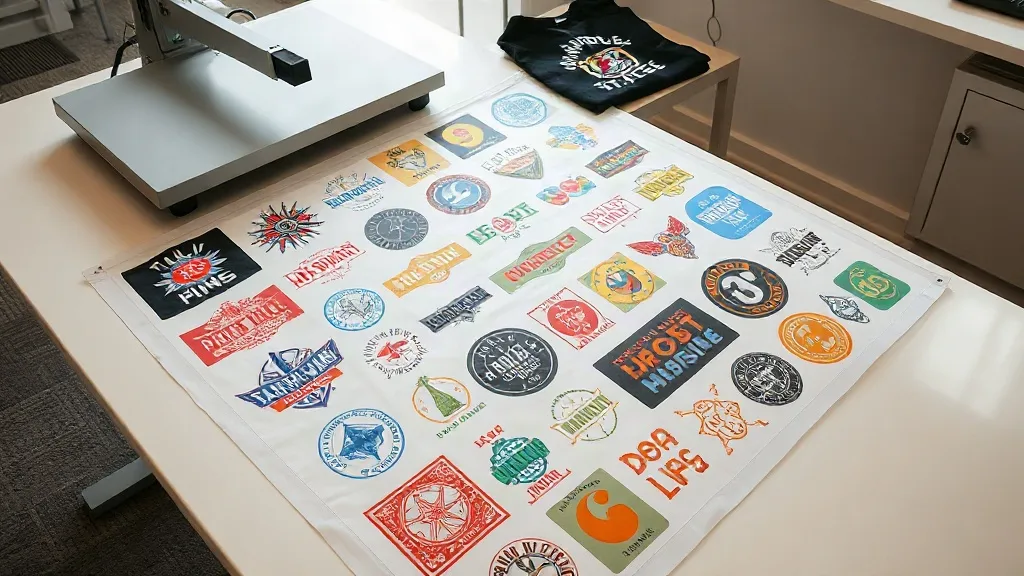
If you run a print-on-demand business, you know that efficiency and cost control are everything. Every minute saved and every cent trimmed adds up to better margins and happier customers. One tool that has quietly revolutionized the workflow for many POD sellers is the DTF Gangsheet. In this article, we'll explore what a DTF gangsheet is, why it's a game-changer for print-on-demand, and how you can use it to streamline your operations and boost your bottom line.
What Is a DTF Gangsheet?
DTF stands for Direct-to-Film, a printing technology where designs are printed onto a special film, coated with adhesive powder, and then heat-pressed onto fabric. A gangsheet is essentially a large sheet of film that contains multiple designs arranged tightly together. Instead of printing each design individually, you gang them up on a single sheet, maximizing the use of space and reducing waste. This approach is similar to gang printing in traditional offset printing, where multiple jobs are combined on one sheet to save time and materials.
In the context of DTF, a gangsheet allows you to print a variety of designs in one go, regardless of their colors or complexity. This is particularly useful for print-on-demand businesses that handle many small orders with different designs. By grouping designs, you can significantly reduce the per-unit cost of printing and streamline your production process.
Why DTF Gangsheets Are a Game-Changer for Print-on-Demand
Print-on-demand is all about flexibility and speed, but those benefits often come at a higher cost per item. DTF gangsheets address several pain points that POD sellers face daily. Let's break down the key advantages.
1. Cost Efficiency
One of the biggest challenges in POD is keeping costs low while offering competitive prices. With DTF gangsheets, you can nest multiple designs onto a single sheet, which means you use less film and less ink per design. The savings on materials can be substantial, especially when you're producing hundreds of items per week. Additionally, because you're printing in bulk, you can take advantage of economies of scale, further reducing your cost per print.
Consider this: a typical DTF film sheet might cost a few dollars, but if you can fit 10 designs on it instead of one, your material cost per design drops dramatically. Those savings can be passed on to customers or reinvested in your business.
2. Time Savings
Time is money, and in POD, speed is crucial. Printing each design individually is time-consuming: you have to load the film, adjust settings, and wait for each print. With a gangsheet, you prepare a single file with all your designs, send it to the printer, and produce multiple transfers in one cycle. This reduces labor time and allows you to fulfill orders faster. For businesses that promise quick turnaround, this can be a competitive advantage.
Moreover, gangsheets simplify inventory management. Instead of keeping track of individual design prints, you have a single sheet that contains many designs, making it easier to organize and store.
3. Design Flexibility
DTF printing doesn't require color separation or special pretreatment, so you can print full-color, photographic designs with ease. Gangsheets take this a step further by letting you mix different designs on the same sheet, regardless of their color complexity. Whether you have a simple logo and a detailed illustration, they can coexist on one gangsheet. This flexibility is perfect for POD sellers who offer a wide range of products and designs.
You can also experiment with different layouts and nesting to minimize wasted space. Some software tools even automate the nesting process, ensuring you get the most out of every sheet.
4. Reduced Waste
Traditional printing methods often leave unused space on transfer sheets, which translates to wasted material. With gangsheets, you can nest designs closely together, leaving minimal unused area. This not only saves money but also aligns with sustainable practices, which is increasingly important to consumers. By reducing waste, you can appeal to eco-conscious customers and differentiate your brand.
How to Create and Use DTF Gangsheets
Creating a DTF gangsheet is straightforward if you follow the right steps. Here's a simple guide to get you started.
Step 1: Prepare Your Designs
Start by gathering all the designs you want to include in the gangsheet. Ensure they are high-resolution (300 DPI is recommended) and in the correct color mode (usually CMYK). If you're using a professional DTF printing service, they may have specific requirements for file format and resolution, so check their guidelines.
Step 2: Arrange Designs on a Canvas
Using graphic design software like Adobe Illustrator, Photoshop, or specialized gangsheet builders, create a canvas that matches the size of your DTF film. Common widths are 13 inches, 17 inches, or 22 inches, but this depends on your printer. Arrange your designs on the canvas, leaving a small gap (about 0.1-0.2 inches) between them to allow for cutting. Try to minimize empty space by rotating and repositioning designs as needed.
Many online tools and plugins can automate this nesting process, saving you time and ensuring optimal layout.
Step 3: Print and Cure
Once your gangsheet file is ready, send it to your DTF printer. The printer will print the designs onto the film, and then you'll apply adhesive powder and cure it under heat. This step is typically done by the printing service if you're outsourcing, but if you're doing it in-house, follow the manufacturer's instructions carefully.
Step 4: Heat Press and Apply
After the transfers are ready, you can cut them apart and heat-press them onto your garments. DTF transfers work on a wide range of fabrics, including cotton, polyester, and blends, without the need for pre-treatment. This makes them versatile for various POD products.
Best Practices for DTF Gangsheets
To get the most out of your gangsheets, keep these tips in mind:
- Optimize nesting: Use software to automatically arrange designs for minimal waste. Manually adjusting can help, but automation saves time.
- Group similar orders: If you have multiple orders with different designs, combine them on one gangsheet to maximize efficiency.
- Test print: Before committing to a large gangsheet, do a test print with a small batch to ensure colors and details are correct.
- Stay organized: Label your gangsheets and keep track of which designs are on each sheet to avoid confusion during fulfillment.
- Choose the right film: Not all DTF films are created equal. Invest in high-quality film that releases cleanly and produces vibrant colors.
Common Mistakes to Avoid
Even experienced POD sellers can stumble when adopting DTF gangsheets. Here are a few pitfalls to watch out for:
- Overcrowding: Packing designs too tightly can make cutting difficult and increase the risk of errors. Leave enough space for clean cuts.
- Ignoring resolution: Low-resolution images will look pixelated when printed. Always use high-res files.
- Inconsistent color profiles: Ensure all designs use the same color profile to avoid color shifts.
- Not accounting for shrinkage: Some fabrics shrink after washing, so consider this when sizing designs.
Frequently Asked Questions
What is the maximum size of a DTF gangsheet?
The maximum size depends on your printer and film width. Common widths are 13", 17", and 22", but some industrial printers can handle wider rolls. The length is limited by the film roll and printer capabilities, often up to several feet. Check with your printing service or printer manufacturer for exact specifications.
Can I mix different fabric types on one gangsheet?
Yes, the gangsheet itself is just a film with transfers. When applying, you can heat-press different transfers onto different fabrics. However, ensure that each fabric can withstand the heat press temperature and pressure required for DTF (typically around 300-320°F).
How do I calculate the cost savings of using gangsheets?
To calculate savings, compare the cost of printing designs individually versus gangsheets. Consider film cost, ink cost, and labor time. For example, if a single design print costs $2 in materials and you can fit 10 designs on a $5 sheet, your material cost per design drops to $0.50. Add labor savings for a more accurate picture.
Are DTF gangsheets suitable for small batch orders?
Absolutely. Gangsheets are ideal for small batches because they allow you to combine multiple designs without minimum order quantities. You can print just one sheet with several designs, making them perfect for testing new designs or fulfilling small orders efficiently.
What software can I use to create gangsheets?
You can use graphic design software like Adobe Illustrator, CorelDRAW, or Photoshop. There are also specialized gangsheet builder tools online, such as Gangsheet Builder or DTF Gangsheet Maker, which automate nesting and help you maximize sheet usage. Some printing services also provide their own tools.
Embracing DTF gangsheets can transform your print-on-demand workflow, making it more efficient, cost-effective, and flexible. Whether you're a small startup or an established POD business, integrating gangsheets into your production process is a smart move. Start experimenting with layouts, optimize your nesting, and watch your productivity soar.